
If you’ve ever been asked, “What’s on your OT network?” and felt a knot form in your stomach, you’re not alone. Most ICS teams know they have gaps in asset visibility; the question is how large those gaps are and what’s hidden within them.
You can’t protect what you can’t see. And in a NERC CIP environment, you can’t comply with what you haven’t inventoried. CIP-002 requires you to identify and categorize your Bulk Electrical System (BES) Cyber Systems. CIP-007 expects you to manage patches and ports on those systems. CIP-010 requires you to baseline their configurations. Every one of those obligations starts with the same prerequisite: a complete, detailed, yet accurate asset inventory.
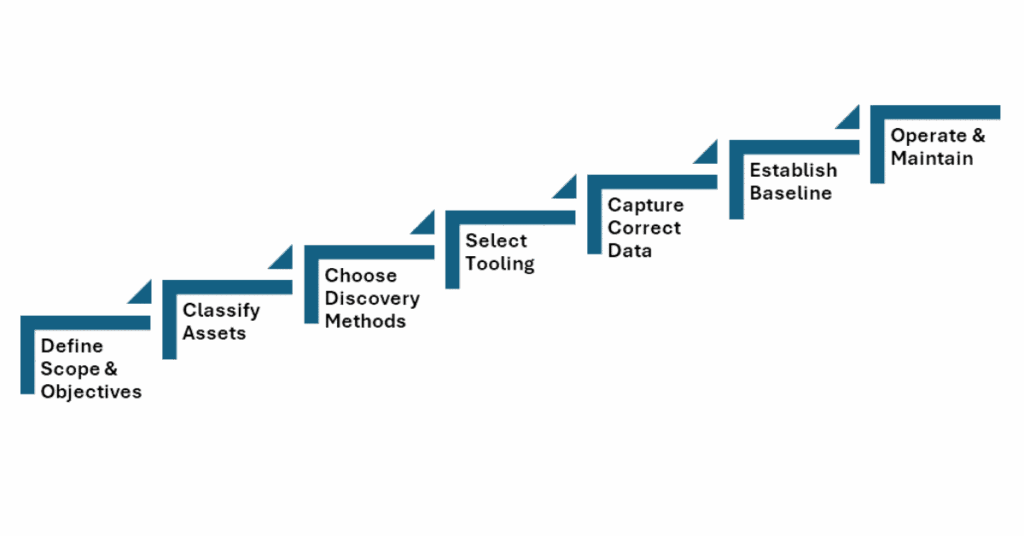
Step 1: Define Your Scope and Objectives
Under NERC CIP-002-5.1a, you’re required to identify and categorize BES Cyber Systems (BCS) as high, medium, or low impact. This categorization drives everything going forward: which CIP standards apply, how granular your controls need to be, and how painful your audit will be. If you want to save some time and work, it will make sense to align your inventory scope with this process from the start.
Map your scope to the Electronic Security Perimeters (ESPs) defined under CIP-005. Every device inside an ESP needs to be inventoried, along with every Electronic Access Point (EAP) and every Protected Cyber Asset sharing the network.
Get your stakeholders aligned early. This could include, but is not limited to, technicians, process or automation engineers, plant operators, IT network teams, and compliance staff. This may be potentially the most challenging aspect of the process as these units often operate in their own silos, schedules, and hierarchies. It is important to remember that any and all groups have something to offer when it comes to knowing what assets need tracking. Techs and operators know what’s actually in the substation panel or which RTUs are still running firmware from 2008. DCS or SCADA control room operators will have the highest view of all sites and understand which ones are troublesome or running the longest in tooth. Security and IT staff will be the readiest to set up tooling and fit network requirements in order to ensure mass collection across the network. You need their knowledge, and you need them to trust the process.
Step 2: Classify What Counts as an Asset
NERC CIP has a specific taxonomy you need to map to:
BES Cyber Assets (BCAs) are programmable electronic devices that, if compromised, would impact reliable BES operation within 15 minutes. This includes EMS servers, SCADA servers, relay protection systems, and generation control systems.
BES Cyber Systems (BCS) are logical groupings of one or more BCAs. This is how CIP-002 wants you to categorize at the system/process level, not the device level.
Protected Cyber Assets (PCAs) are devices inside your ESP that aren’t BCAs but share the network. This includes historians, HMI workstations, file servers, and time servers.
EACMS (Electronic Access Control or Monitoring Systems) includes firewalls, authentication servers, jump hosts, and log aggregators.
PACS (Physical Access Control Systems) cover badge readers, camera systems, and associated servers protecting Physical Security Perimeters.
Don’t overlook what’s easy to miss: serial-connected relays and RTUs without IP addresses, network infrastructure inside the ESP (managed switches, serial-to-IP converters/gateways), Transient Cyber Assets (engineer laptops that move between IT and OR networks), and Removable Media under CIP-010-2 (maintenance laptops, USB drives), and virtual machines running distinct BCS functions.
Step 3: Choose Your Discovery Methods
Passive network monitoring: your safest starting point
Passive monitoring listens to network traffic without injecting packets. A TAP or SPAN port on your ESP switches lets you identify devices by their protocols and addresses. It’s safe for real-time control networks and reveals communication flows valuable for CIP-005 and CIP-007.
This is generally how most security monitoring tools work, as it has no presence in the process network and can observe actions without ever having any risk of inserting themselves in the process network as a talking device. There may be a need to deploy several passive network monitoring tools in large-scale networks that do not often cross-talk to one another. Additionally, in networks where some isolated devices are only speaking to one another or rarely at all, passive network monitoring may fail to show a complete picture or lack the detail needed for an asset inventory.
However, it is often surprising to most how much detail can be derived from passive network monitoring. Information like vendor, firmware versions, protocol details, service/protocol versions, and more can easily be seen and characterized from well-placed security monitoring tools.

Active scanning (with the right tool)
Active scanning has historically been risky in OT. Legacy PLCs, control panels, and more weren’t designed for traffic outside their exact designed use, and generic IT scanners can cause faults, reboots, or worse. However, active scanning can shed light on segments and blind spots like dormant workstations, backup HMIs, nested devices, or forgotten test equipment.
The key is using tools purpose-built for OT networks. Solutions like Insane Cyber’s Valkyrie perform active scanning, speaking Ethernet/IP and Modbus using protocol-native queries, the way devices expect to be spoken to. That’s the difference between knocking on a door and kicking it in. Toolkits utilize active scanning, often using specific commands that these devices would understand and be able to respond to with actionable and safe data.
When paired with continuous monitoring, active scanning becomes more than a point-in-time snapshot. You get an evolving, real-time picture of what’s on your network. There is less guesswork in identifying when new devices appear, configurations change, or assets go offline. That’s visibility, passive monitoring, and manual walkthroughs alone can’t sustain at scale.
The good news is that while legacy systems were prone to erratic or unpredictable responses to malformed or unexpected packets, many (if not all) newer ICS assets being sold and installed are running stronger network stacks that are built for this type of traffic. If your IT and OT network administrators can identify which systems are robust or new enough to handle traffic like active scanning, it can result in some great detail to enrich your asset inventory.
Manual inspection and documentation review
Even with solid tooling, sometimes the best discovery method is windshield time (rolling trucks), a pair of boots, and a flashlight. Walk through your substations (a great time for your IT-focused security staff to get a look at what exactly they are trying to secure, by the way). Open panel doors to trace Ethernet cables back to process or core switches. Compare what you find against one-line diagrams, network drawings, and existing asset lists. Often enough, the documentation on hand is dated and inaccurate, and physically taking account of what is present in plant networks will be the best way to ensure that all assets are accounted for or identified as no longer in use. This could also include actions like pulling configuration exports from engineering software or DCS/SCADA point databases.
Manual inspection catches things even good tools miss: serial-only devices, air-gapped systems, and forgotten equipment. The best results come from combining automated discovery with boots-on-the-ground validation.
Step 4: Select Your Tooling
Purpose-built OT security monitoring platforms
At this point, it may be apparent that standard IT-focused tooling will likely not be enough for your requirements. Opt for a platform engineered for industrial environments that understands protocols like DNP3, Modbus, IEC 61850, MMS, MQTT, IEC 104, OPC, EtherNet/IP, and more that can extract device information without disrupting operations.
This is where Insane Cyber’s Valkyrie fits. Valkyrie leverages both active scanning and continuous network monitoring, giving you both initial discovery and ongoing visibility in one platform. Rather than treating asset discovery as separate from security monitoring, Valkyrie brings them together to find your assets and also watch them, detect changes, and flag anomalies.
For NERC CIP, look for platforms that can:
- Map assets to CIP categories (BCA, PCA, EACMS)
- Track firmware versions for CIP-010
- Identify open ports for CIP-007
- Detect unauthorized connections for CIP-005.
| CIP Requirement | Toolkit Capability |
| Asset Categorization (BCA, PCA, EACMS) | Automatically identify and/or tag assets |
| CIP-010 | Track firmware versions |
| CIP-007 | Identify open network ports |
| CIP-005 | Detect unauthorized connections |
The less manual effort required to generate compliance evidence, the more time your team spends on actual security.
Spreadsheets and Integrations
Many asset owners still manage inventories in spreadsheets. For a low-impact environment with a handful of substations, that may suffice. However, spreadsheets don’t scale, lack any auto-update, often fail to track changes effectively, and make audit evidence generation painful. Most tools will provide CSV outputs of asset inventory databases for importing and moving between environments and tools. Look for opportunities to centralize IT and OT asset management and a toolkit that integrates easily (either technically or in workflow) to reduce inefficiencies.
Your asset inventory should feed into your CIP-007 patch management, CIP-010 configuration baselines and vulnerability assessments, CIP-005 ESP documentation, and your CMMS for maintenance tracking. An isolated asset database that nobody references is just a compliance artifact, whereas an integrated one is an operational tool.
Step 5: Capture the Right Data Points
For each device, these are data points to capture:
Identity and classification
- Device name (hostname)
- Type/role
- Vendor/manufacturer
- Model
- Serial number
- BES Cyber System membership
- CIP asset category
- CIP impact rating
Software and firmware
- Firmware/software version
- Related application software
- Patch version
Network information
- Network/hardware addresses (IPV4/6, MAC)
- VLAN assignment (or subnet/segment designation if not using VLANs)
- ESP membership
- Protocols in use
- Active ports and services
- Upstream/downstream connections/routes
Physical context
- Site
- Facility
- Building
- Plant/station
- Room
- Cabinet/panel
- Rack number and/or shelf number
- Associated PSP
- GPS latitude/longitude (for very remote locations)
Ownership and lifecycle
- Responsible engineer
- Installation date
- End-of-life/end-of-support dates
- Vendor support status
It is helpful to avoid over-engineering on day one. The more important thing is to lock down core identity, classification, and network data first. Once basic inventorying capability is operationalized, you can layer in high-fidelity details, risk scores, communication flow maps, and maintenance history once the foundation is solid. Make sure to check in with your stakeholders to establish who can best provide each category of information and understand which datasets are most helpful for their common operations. The inventory is more likely to be utilized in everyday processes if more workers are aware of it and keep it updated in their usage.
Step 6: Establish a Baseline and Validate
Compare discovered assets against all existing sources, including CIP-002 identification lists, CIP-005 ESP documentation, CIP-010 baseline records, current or previous network diagrams, and SCADA architecture documents. Again, be sure to loop in stakeholders with an investment in ensuring these documents are as accurate and precise as needed.
Here are three things to be on the lookout for:
- Documented assets that weren’t discovered (decommissioned? powered off?)
- Discovered assets that aren’t documented (replacement? shadow devices, rogue connections)
- Assets where documented details don’t match reality (wrong firmware version, different IP)
If you can get some time from them, take your reconciled inventory back to field engineers, operators, and techs. If you can walk through the facility by facility, they’ll catch errors no tool ever will. That “unknown device” might be a contractor’s test equipment that was never removed. That relay showing firmware 5.2.1 might have been upgraded to 5.8.2 last quarter. Your vendor patch management router may be in a segment of the network that was not intended. These findings do not directly mean failure or bad, so ensure you document your gaps honestly. Your regional entity auditor will respect a well-documented gap closure plan far more than a sloppy inventory that pretends to be complete.
Step 7: Prioritize and Assess Risk
Map each asset to its role in BES reliability. Which assets are going to produce the worst day if they go down? Which ones will bring potential for cascading failures? Which devices control generation dispatch or provide operator situational awareness? Here is another instance in which involving your stakeholders will net the best result for understanding your crown jewels and your most critical assets in the process.
Now is the perfect time to cross-reference your firmware and software versions against CISA ICS-CERT advisories, vendor bulletins, and the National Vulnerability Database (NVD). You need this for CIP-010-2 vulnerability assessments, but more importantly, it tells you where your real exposure is. This can also generate some remediation tickets for low-hanging fruit, prioritize which processes get more funding next cycle, or give your SOC better context to enrich their alerting and own risk scoring.
Flag every device running unsupported software or firmware. These are your highest-risk assets from a CIP-007 patch management perspective. This is especially important for devices with known vulnerabilities because no patches are coming to remediate the risk. You’ll need compensating measures like enhanced segmentation, monitoring, and application whitelisting, all documented in your CIP evidence.
Step 8: Operationalize and Maintain
Now that your initial asset inventory has been built, the finish line was actually a starting line. An inventory that’s accurate on day one and wrong six months later is a liability. Here are some common Dos and Don’ts in operations that can help prevent all of your work from atrophying.
OT Asset Inventory: Do’s and Don’ts
| Category | Do | Don’t |
| Discovery & Visibility | Use IT scanning tools on OT networks—they can and will cause disruptions. Use tools designed for industrial environments. Let CIP categorization drive discovery. Find everything first, then categorize to uncover unknown assets. Ignore serial and non-IP devices. They may not appear in network discovery, but are still BES Cyber Assets. | |
| Monitoring & Change Detection | Automate continuous monitoring. Configure alerts for new devices, disappearing assets, communication changes, and new ports. Supports CIP-007 and CIP-005 in real time. | |
| Inventory Maintenance & Reviews | Establish a review cadence: quarterly reviews of high- and medium-impact BCS inventory, plus annual audits with physical walkthroughs aligned to CIP-010 and CIP-002. | Treat this as a one-time project. Building the initial inventory is only ~30% of the effort—maintenance is the other 70%. |
| Ownership & Change Management | Assign clear ownership. Define who updates records, who reviews changes, and how discrepancies are resolved. Integrate with CIP-010 change management so any change to BCA, PCA, or EACMS triggers an inventory update. | |
| Documentation & Process Integrity | Fail to document your methodology. Maintain a clear, repeatable process for audits and continuity. | |
| Integration with CIP Requirements | Use your inventory as a single source of truth to support CIP-007, CIP-010, CIP-005, CIP-011, and CIP-008 processes. | |
| Collaboration & Stakeholder Involvement | Involve relevant stakeholders throughout the process to improve accuracy and collaboration. | |
| Special Asset Considerations | Ignore serial and non-IP devices. They may not appear in network discovery, but are still BES Cyber Assets. |
Conclusion
Building an OT asset inventory is methodical, detail-oriented work that requires collaboration across teams. But it’s the single most impactful thing you can do for your OT security program and NERC CIP compliance posture.
You don’t need a perfect inventory on day one. You need an honest one that gets better over time, backed by a process that keeps it current. The utilities that do this well aren’t just passing audits, but rather, know their environment, respond to incidents faster, and make informed decisions about where to invest. That’s the real payoff.
Have questions about building your OT asset inventory or aligning it with NERC CIP requirements? Contact us to learn more.